
1E-Tachyon-Platform
 1E Verified
Downloads
200
Endorsements
10
Components
31
Added
6 years ago
Last Updated
1 month ago
Compatibility
Client Supported - 23.11, 24.11, 24.5, 25.11, 25.5, 25.9, 26.5, 26.7, 9.0
OS Supported - All
OS Supported - All
Description
Platform - This pack supports following additional properties sent by 1E Client as part of Online message:
- OuPath
- BatteryHealth
- NativeDiskEnryption
- BiosVersion
- FreeOsDiskSpaceMb
Diagnostics- How to upload instruction
Diagnostics instruction can be downloaded from 1E exchange, then follow the below steps to upload the instructions into the portal.
- Login to 1E platform
- Navigate to Settings->Instructions->Instruction sets
- Click on Add new set and provide the name Rapid Endpoint diagnostics, click ADD. A new instruction set folder is created.
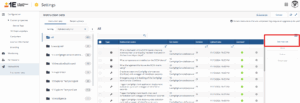
- Now Click on Upload button->Select the downloaded diagnostics instruction and upload.
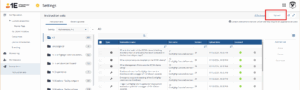
- Instruction get uploaded and get added to unassigned folder.
- Navigate to Unassigned folder -> select the diagnostics instruction-> Click on move → Select the Rapid Endpoint diagnostics and click on move.
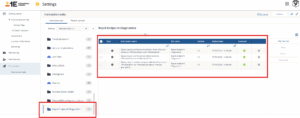
Components
1E-TachyonPlatform-ANM-AppNetworkUdpData
INSTRUCTION
1E-TachyonPlatform-ANM-AppNetworkTcpData
INSTRUCTION
What's New
13-Sep-2026: Added ANM specific instructions
15-Jun-2026: Updated instructions to support v26.5 release
28-Jan-2026: Added Device Metrics Diagnostics instruction
08-Sep-2025: Updated instructions to support v25.9 release